OBJECTIVES OF ONLINE TYPING COURSE
Here are the objectives of an online typing course:
Typing course training center in khanewal Improve type speed and accuracy. Online typing courses can help you learn to type faster and more accurately. This can be a valuable skill in both your personal and professional life.
productivity gains. You can complete more work in less time if you can type more quickly and precisely. This can help you save time and money, and it can also help you advance in your career.
Reduced stress. When you don’t have to worry about looking at the keyboard as you type, you can focus on what you’re writing. This can help you reduce stress and improve your overall writing quality.
Improved computer skills.If you want to do type quickly and accurate then join the typing course training center khanewal. Learning to type is a valuable computer skill that can help you with a variety of tasks, such as using word processing software, creating presentations, and browsing the internet.
Increased confidence. When you can type quickly and accurately, you’ll feel more confident in your ability to use a computer. This can lead to increased opportunities and success in your personal and professional life. If you want to do type quickly and accurate then join the typing course training center khanewal.

CONTENT OF FREE ONLINE TYPING COURSE
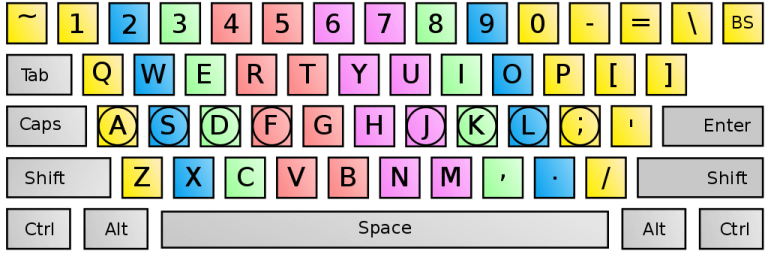
- Basic Keyboard Familiarization: Introduction to the keyboard layout, key placement, and finger positioning.
- Touch Typing Techniques: Learning the correct hand and finger placement on the keyboard, including the home row keys.
- Typing Speed and Accuracy: Strategies for improving typing speed while maintaining accuracy, including techniques such as rhythmic typing and avoiding unnecessary movements.
- Typing Exercises: Various typing exercises and drills to reinforce muscle memory and develop finger dexterity.
- Special Characters and Symbols: Practice typing special characters, numbers, and symbols commonly used in documents, emails, and programming.
- Typing Tests: Regular assessments to measure your typing speed, accuracy, and progress over time.
- Typing Games: Engaging typing games to make the learning process more enjoyable and interactive.
- Text Formatting: Instruction on formatting techniques such as using capitalization, punctuation, and proper paragraphing.
- Advanced Typing Skills: Advanced techniques like typing numbers using the numeric keypad, using shortcuts, and typing with special characters.
- Practice Materials: Access to a wide range of texts, articles, and passages for typing practice to improve both speed and comprehension.
OVERVIEW TYPING COURSE
A typing course is a training program that teaches students how to type quickly and accurately. Typing courses typically cover the following topics:
- Business typing: This includes learning how to type in a business setting, such as how to format documents and create presentations.
- Keyboard shortcuts: This includes learning how to use keyboard shortcuts to save time and improve productivity.
- Typing games: Typing games can be a fun way to practice your typing skills. They can also help to improve your speed and accuracy.
BENEFIT OF TYPING COURSE
There are many benefits to taking a typing course.
- Increased productivity: When you can type quickly and accurately, you can get more work done in less time. This can save you time and money, and it can also help you advance in your career.
- Reduced stress: When you don’t have to worry about looking at the keyboard as you type, you can focus on what you’re writing. This can help you reduce stress and improve your overall writing quality.
- Improved computer skills: Learning to type is a valuable computer skill that can help you with a variety of tasks, such as using word processing software, creating presentations, and browsing the internet.
- Increased confidence: When you can type quickly and accurately, you’ll feel more confident in your ability to use a computer. This can lead to increased opportunities and success in your personal and professional life.
- Improved hand-eye coordination: Typing requires good hand-eye coordination, which is a skill that can be helpful in many other activities, such as playing sports or playing musical instruments.
- Improved overall mental health: Typing can help to improve your overall mental health by reducing stress, improving focus, and increasing confidence.
Who this course is for:
- Any Student
- IT Students
- In Job Staffs
- Graduate Students
TYPES OF TYPING
There are many different typing techniques, each with its own strengths and weaknesses.
- Hunt and peck: This is the most basic typing technique. With hunt and peck, you look at the keyboard as you type, and you use your index fingers to type the most common letters. Hunt and peck is the slowest typing technique, but it is the easiest to learn.
- Touch typing: Touch typing is a more advanced typing technique. With touch typing, you don’t look at the keyboard as you type. Instead, you use all ten fingers to type, and you memorize the location of each key. Touch typing is the fastest typing technique, but it is the most difficult to learn.
- Hybrid typing: Hybrid typing is a combination of hunt and peck and touch typing. With hybrid typing, you use a combination of looking at the keyboard and not looking at the keyboard as you type. Hybrid typing is a good option for people who want to type faster, but who don’t want to invest the time and effort to learn touch typing.
About the Author